This is the English edition of a review from my Japanese YouTube channel, iestaLife. I test gadgets from my home in Japan, so product links go to Amazon Japan.
Quick take
The iPhone 17 Pro Max has a much larger aluminum camera plateau, and I wanted to protect it without hurting photo quality. Over about three weeks I tried four options. A thick cover with open lens holes noticeably narrowed the LED flash beam, so I stopped using it. A slim full cover barely affected photos but looked glossy and toy-like. What I settled on: a carbon-pattern film on the aluminum, plus a lens cover with its glass popped out so only the metal rings remain.

What I tested
- A slim aluminum plate that covers the whole plateau, with glass over the lenses (CANLER)
- A thick aluminum plate with open holes over the lenses
- ClearView carbon-pattern and matte films for the aluminum area
- A Podick lens-only cover (¥1,349 at the time of recording)
- The same covers with their lens glass removed, used as “frames”
What I found
| Type | Covers | My impression |
|---|---|---|
 | Whole plateau, plus glass over the lenses | Easy to fit; little visible change in photos; glossy finish makes the color look darker |
 | Whole plateau; lenses open | Fit with Apple’s case; LED beam became narrower; looks bulky |
 | Flat aluminum area only | Soft and easy to apply; hides bubbles; no effect on the LED |
 | Around the three lenses | Fits over the film; no visible flare in a dark-room test; glossy |
The thick cover changed the flash. Its LED opening is deep, and in a dark room the light spread was clearly narrower than without a cover. Fine as a flashlight, but I didn’t like it for photos.

The slim cover barely touched image quality. I shot the same scenes outdoors, indoors and toward the sun before and after; in bright light I couldn’t see a difference. Removing it bent the thin plate, so it isn’t reusable.
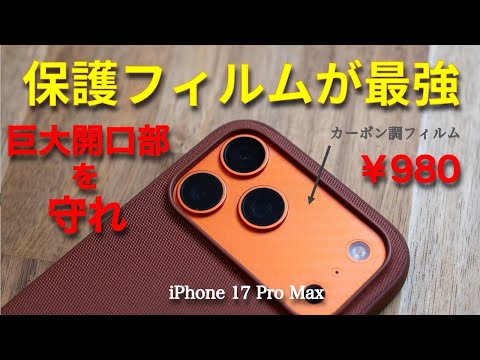
Film is the most natural option. The carbon pattern hides dust and bubbles and keeps the phone’s original color. The plain matte version is nearly invisible but less forgiving to apply—hold it with tape instead of your fingers.
Applying the carbon film for the first time. I used the ClearView carbon-pattern clear type, made in Japan, which cost about ¥700–800 at the time of the video. It is soft and easy to handle, but it slipped out of place once, so I recommend positioning it with masking tape. No dust-removal sticker is included. The pack also has a piece for the lower part of the camera area, which a case covers anyway; a commenter wished for extra top pieces instead, and I agree, since film is a consumable. A few bubbles got in, but the pattern made them hard to see.
It leaves the lenses bare. For what it’s worth, I have used an iPhone every year without anything on the lens glass and never had a scratch there, though that is no guarantee. If you want a lens-only cover too, put the film on first. I worried the film’s thickness might stop the cover from sitting flat, but the Podick cover I tried later fit fine on top of it. In this video I still ranked film first, for now, for anyone who wants to keep the phone’s original color.
Order matters. Put the film on first. A lens-only cover applied first has to come off before you can add film, and it took real force and left adhesive residue.

Frames only, no glass. The glass in both lens covers pops out with a firm push. With just the rings left, nothing sits over the lenses, and it still fit under a 0.3 mm memumi case and Apple’s own case.
Who it’s for
- Want the phone to look untouched: carbon or matte film on the aluminum
- Want lens-edge protection without glass over the lenses: film plus a lens cover used as a frame
- Use the phone without a case: a slim full cover gives the most peace of mind
- Want the lenses off the table when the phone lies flat: a thick cover—but expect the flash to change
Watch the video

The video is in Japanese. Useful moments: around 4:10 for the LED flash comparison, and 10:30 where I discover the lens glass can be pushed out. I made several follow-up videos on the same setup; the film comparison and the final “frames only” setup are linked from the Japanese article.
Limitations
These are short-term tests on one orange iPhone 17 Pro Max over a few weeks. My photo comparison was informal, shot at different times of day. I could not confirm the product name of the thick cover, so it is not linked. Long-term effects of adhesive on the aluminum finish are unknown; I plan to replace films every few months.
Products
ClearView back protection film, carbon pattern (iPhone 17 Pro Max): on Amazon Japan
ClearView back protection film, matte (iPhone 17 Pro Max): on Amazon Japan
CANLER camera lens cover, slim full-plate type (iPhone 17 Pro Max): on Amazon Japan
Podick lens-only camera cover (iPhone 17 Pro / 17 Pro Max): on Amazon Japan
memumi 0.3 mm ultra-thin case (iPhone 17 Pro Max): on Amazon Japan
Most of these accessories are listed for the Japanese market. The Amazon Japan links above are affiliate links. As an Amazon Associate, I earn from qualifying purchases. Check the listing for the exact model, current price and shipping availability in your region.
More reviews in English


All Screen & Lens Protectors (27) →Browse all English reviews →
This review is also available in Japanese.